For your clients
On the client’s side, fewer messages back and forth, more clarity.
Booking, confirming, joining a video session, seeing past sessions and knowing what is left to pay: your client does it all from the phone, with nothing to install, under your practice’s name.
The client’s path
From the first booking to the receipt.
Book
They pick the time on their own.
Through the link you send, the client sees only the free slots, never the booked schedule, and chooses whether the session is in person or by video. The booking goes in right away or becomes a request for you to approve, as you prefer. Someone who is not yet a client books through your public page and comes in as a request.
Hi, Maria
Pick a time with Helena
Mon 2Tue 3Wed 49:0010:0015:00In personBy videoConfirm Tuesday, 15:00
Confirm
The confirmation arrives on its own.
With confirmations on, the platform asks for confirmation before the session: through the practice’s official WhatsApp, by SMS or by e-mail. The client confirms right there. If they reply to the confirmation on WhatsApp that they can’t make it, and you allow clients to cancel, the slot is freed and you are told; past the notice period, your late cancellation rule applies. Otherwise, the reply goes to the team.
Travessia Practice
Hi, Maria! Your session with Helena is on Tuesday, Nov 3, at 15:00. Can you confirm?
Yes, confirmed✓ confirmed on the schedule
Join the session
The room link arrives on its own.
For a video session, with automatic sending on, the link goes out by WhatsApp, SMS or e-mail before the time. The client joins in the browser, without creating an account or installing anything, and waits until you open the door. In a family session, each person joins through the same link under their own name.
Helena
Today at 15:00 · Travessia Practice
Join
You wait a moment until Helena opens the door.
✓ link sent 30 min before
Talk
Two conversations, each in its place.
In the portal, the conversation with the practice covers schedules and payments, and the front desk answers it. The private conversation is between the client and you, and the front desk doesn’t see it. When a new message arrives, they get a notice on the phone or by e-mail that only says there is a message in the portal.
PracticeHelena· privatePractice
Maria, Tuesday’s session stays at 15:00, by video. The link will arrive beforehand.
You
Great, thank you!
Follow along
Sessions in view, the whole month.
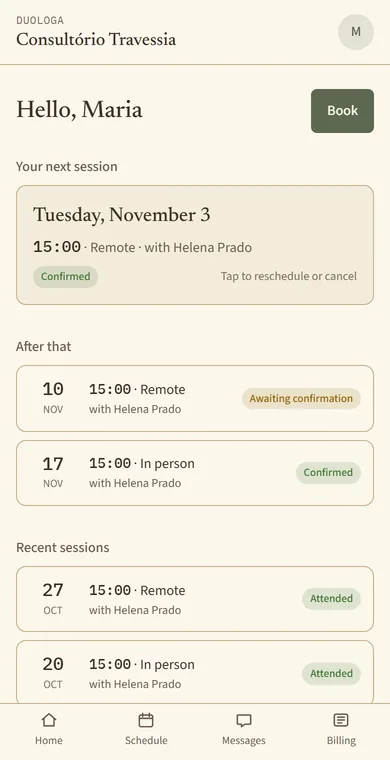
The next session up front, the month’s calendar and past sessions with what happened: attended, no-show or cancelled. Within the notice period you set, the client cancels or reschedules on their own, and the team’s schedule shows it was them.
Illustration: November calendar with sessions on Tuesdays, the 3rd, 10th, 17th and 24th.
Pay
What is due, and how to pay.
The portal shows open charges with the total, the PIX key the practice registered, to copy, paid ones with the receipt number, once issued, and how many sessions are left in a package. If the practice uses reminders, the client also gets the notice of amounts due by WhatsApp or e-mail. The practice marks the payment as received.
Open
- Session Oct 20R$ 180.00
- Session Oct 27R$ 180.00
TotalR$ 360.00
PIX keypix@example.comCopyPaid✓ Session Oct 13 · receipt no. 0142
And when you ask, the client answers the follow-up scales (PHQ-9 and GAD-7) through a link on the phone, and the result goes into the case follow-up.
Video sessions, the official WhatsApp line and the SMS package are add-on modules to the plan. E-mail comes with the plan.
You stay in charge
What the client can do is up to you.
- Whether a booking goes in right away or as a request for you to approve.
- Which days and times show on the link, and how far ahead they can book.
- Whether they can cancel and reschedule in the portal, and until when.
- The booking link and portal access can be revoked at any time.
- Automatic confirmations and reminders follow the client’s communication consent.
Client privacy
What they say in session stays with you.
The record stays on your side
The portal shows schedule, messages and amounts. Records, transcripts and analyses never show up for the client.
Discreet notices
The automatic new-message notice only says there is a message in the portal. A copy with the text goes out only when the team ticks it, and only in the practice conversation.
Private conversation
The conversation with you doesn’t show up for the front desk. Only the supervisor of a case you shared can read it, and reading it is logged.
No password
The client signs in with a Google Account or an access link sent to the e-mail on file, and the invitation only works for that e-mail.
Questions
What professionals ask.
Does the client need to download an app?
No. Everything works in the phone’s browser. If they want, they can add the portal to the home screen, like an app, without going through a store.
Does the client pay through the portal?
They see what is due and copy the PIX key the practice registered. They pay through their own bank, and the practice marks it as received.
What if they see professionals at more than one practice that uses Duologa?
They choose where to go when opening the portal and switch whenever they like.
Can I see the portal the way the client sees it?
Yes, for the cases you see. In the file, “View the portal as the client” opens it read-only, even before access is granted, with what you also see: your conversation with them, your charges and the packages.
Simpler for you and for the people you see.
Sign in with Google and get started. 30 days free, no card.