Features
Your whole practice in one place, from scheduling to finances.
Four areas that talk to each other: a booked slot becomes a session, the session becomes a record and the record becomes a charge, without moving from one program to another. The names below are the same ones you will find in the menu.
Scheduling and communication
Appointments booked, confirmed and remembered.
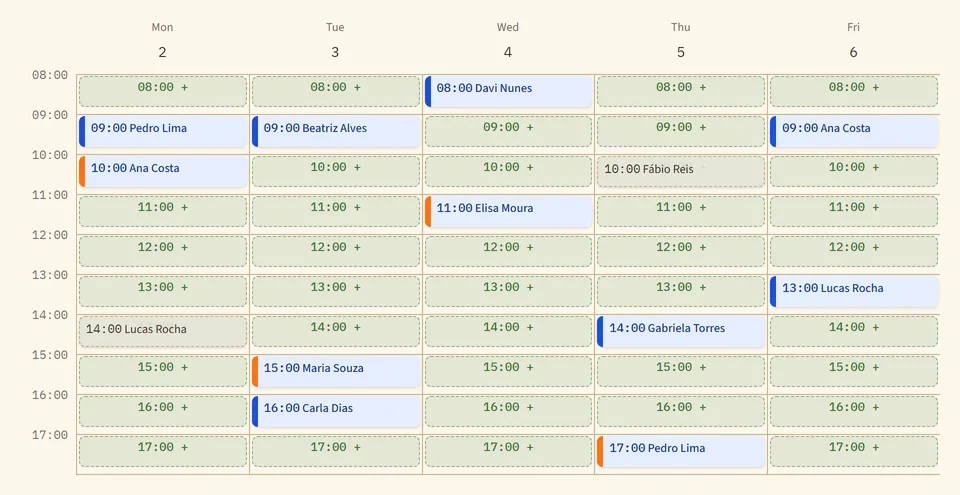
The calendar organizes your day and reaches each client through the channel that works for them.
- Day, week and month views
- Each color tells you the state of the slot: open, blocked, confirmed or no-show. On a computer, drag the card to reschedule; on a phone or tablet, use "Move time".
- Recurring appointments
- Sessions every week, every two weeks or every month, with conflicting dates shown before saving. When the series is close to its end, the calendar warns you and "Extend" books the next period.
- Availability you draw
- Draw your working week on a grid, with one-off blocks, vacations and commitments. The front desk can also adjust each professional’s grid.
- Booking link
- Each client has a link that shows only your open slots; the booking is confirmed right away or comes in as a request, as you prefer. An open page takes requests from people who are not clients yet.
- Automatic confirmations
- With confirmations turned on, the message goes out 1, 2 or 3 business days ahead, by official WhatsApp, SMS or e-mail, and the client confirms through a link. On the official WhatsApp line, a written reply also counts: "yes" confirms, and "I can’t make it" cancels within the rules you set.
- Templates and sent messages
- The text of each message lives in Communication, with a preview and a sample sent to your own number. In Sent, each message shows whether it was delivered, whether it was read, or why it did not go out.
- Billing reminders
- By e-mail or WhatsApp, one by one or in a batch, for open charges, whenever you decide to send them.
- Alerts in the bell and on your phone
- The bell tells you what happens out of your sight: a booking request, a client who rescheduled, a video link that did not go out. Installed as an app and with your permission on the device, the platform alerts you on your phone when a client message arrives.
Sessions
In person or by video, with or without recording.
The session happens wherever you work, and whether it is recorded is up to you and your client.
Recording and transcribing the session audio only happen with the client’s consent. Duologa does not record or keep the image of the video call; a video file you upload to transcribe is kept as uploaded. Video minutes are an add-on, bought in packages.
- A video room inside the platform
- The format is chosen per session. The client joins through the link, with no account and nothing to install, and waits in the waiting room until you admit them. In joint sessions, the family joins through the same link.
- The link goes out on its own
- With automatic sending turned on, the room opens and the link goes by WhatsApp, SMS or e-mail 15, 30 or 60 minutes ahead. When you open the clinical record, the call becomes a small window you can drag around.
- Transcribe mode
- For those who do not want to keep the voice. The audio is not kept on the phone, tablet or computer: it uploads in segments during the session, and each segment leaves the device as soon as it arrives (with no internet, only what has not uploaded yet waits on the device). When the transcript is ready, Duologa deletes the audio on its own. If the transcription fails, it is kept for up to 7 days for another try.
- Recording on a phone or computer
- With recording consent, record the session in the browser. If the internet drops, the audio stays on the device and uploads on its own when the connection returns. Forgot something? "Record another segment" adds it to the end of the conversation.
- Transcription with speakers
- With the client’s consent, the audio becomes text in Portuguese, with the voices separated. You say who is who (client, you, mother, stepfather) and correct right in the text.
- Handwritten notes on a tablet
- In Tablet mode, write with the pen as you would on paper. The handwritten note stays in the clinical record and, if you want, AI converts it into text.
- A deadline for deleting audio
- The account chooses how long recordings are kept. When the period ends, the audio goes; the transcript and the clinical record stay.
Clinical records with AI
AI organizes what was said. You decide what stays.
Everything AI produces is a suggestion for your own reading. The search, AI Listening, the Risk Sentinel and the genogram show the excerpt each point came from.
AI suggests, you decide: analyses and documents only go into the clinical record with your approval. The only exception is the session summary, which goes in marked as an AI record until you edit it.
See the AI in client care in detail- Session summary in the record
- When processing ends, the summary goes into the clinical record marked as an AI record, for you to edit; once you edit it, the mark goes away. The account can turn this off and record only what you approve.
- Analyses by approach
- Readings of the session in CBT, psychoanalysis, humanistic (person-centered), ACT, DBT or social constructionism, or guided by your own instructions. Each one starts as a draft: you reject, edit or approve.
- Continuous clinical record
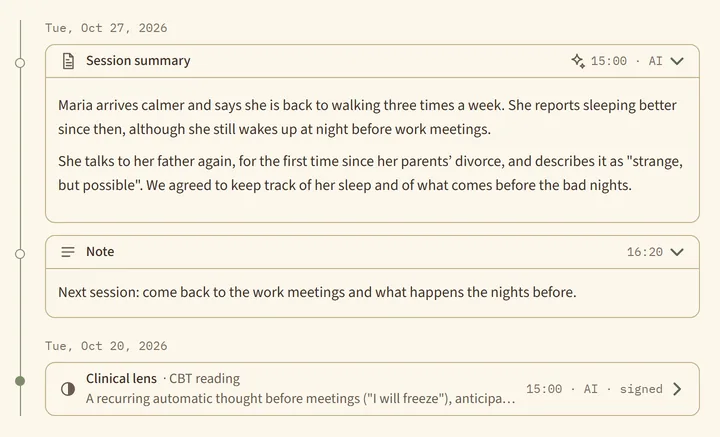
- A timeline by day with notes, summaries, handwritten notes, documents and attachments in PDF or image.
- Guiding Thread and Case memory
- Ask "how has the insomnia evolved?" and get the exact excerpts, session by session; one click opens the conversation at the right spot. Case memory gathers the themes that keep coming back.
- AI Listening
- Talk about a client with an AI that has read the sessions and the clinical record. It cites the source of each statement, for you to check; without an excerpt to support it, it says it did not find one. No need to copy the case into a general-purpose AI: the conversation is stored, encrypted, and only you can see it; the questions go into the audit trail and nothing is used to train AI models.
- Genogram and Life timeline
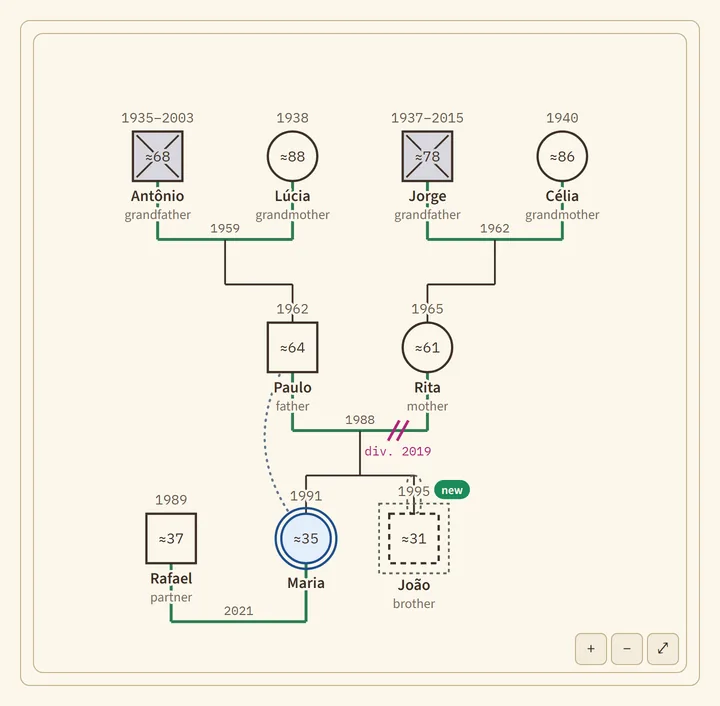
- The family and the milestones of a life, recorded from the sessions with the excerpt and the degree of certainty. You validate and complete; the relationships between people, only you draw. The genogram exports to PDF or image.
- Thermometer
- PHQ-9 and GAD-7 applied in session or through a link the client answers on their phone, with a chart of how they evolve. They are screening and follow-up scales, not diagnostic tools.
- Risk Sentinel
- Points out, for you to assess, excerpts from the session that may indicate risk, with a suggested course of action. Nothing is sent to the client or to anyone else. It can miss a relevant situation: it does not replace your own risk assessment or emergency care.
- Documents
- Reports, opinions and statements in the structure required by Brazil’s psychology board (CFP), with gaps where information is missing. Once signed, the document does not change. AI does not write psychological assessment reports, on purpose.
Management
Finances and the team, with no separate spreadsheet.
Charges come from the calendar, and each person on the team sees only what their work requires.
- Practice finances
- A charge is created when the session ends, at the agreed fee, and the month shows what was received, what is still due and what is overdue. The platform records the payment (PIX, cash or card); it does not receive the money.
- Receipts, packages and insurance
- Numbered receipts in PDF, prepaid packages that deduct each session, and insurance claims with a queue of what to send, what was sent and what was received.
- No-show charges
- No-shows and last-minute cancellations can generate a charge for the session fee, and only the professional of that slot can waive it.
- Monthly closing
- For clients who pay by period, close the week or the month, with a preview before the charge is created.
- Each professional is paid their own way
- In a clinic, each professional is paid through the practice, with a payout by percentage or by session, or directly by the client. Both modes coexist.
- Client overview
- Your clientele in numbers: age, city, frequency, in person or by video, payment method. Only registration and operations, nothing from the clinical record.
- Team and roles
- Administration, team, professional and front desk add up for those who do everything themselves; supervision is a separate role that reads only the cases shared with it. The front desk schedules and bills without opening the clinical record.
- Supervision
- Share a whole case or a single session with your supervisor, read only, and end it whenever you want. They read the sessions, analyses, genogram and scales, can talk to AI Listening about the case, and their access to the record and to AI Listening goes into the audit trail. One supervisor per professional comes with the plan, including on Solo.
- One login, several accounts
- If you see clients in your own practice and at a clinic, or supervise in more than one place, you sign in with the same login and pick the account when you enter.
- Audit trail
- Opening the record, searching the case, talking to AI Listening and downloading or signing documents is recorded: who, what, about whom and when. No one can change that record.
- Help with an assistant
- Articles on every screen and an assistant that answers questions about using the platform and checks how your account is set up, with no access to clinical content.
Official WhatsApp
The practice speaks from its own number, through the official WhatsApp API.
Duologa is a WhatsApp Business (Meta) technology provider: each practice connects its own line (its number, on its Meta account), and the platform starts sending appointment confirmations and billing reminders through it, with real delivery and read status, without depending on anyone’s phone.
The practice’s line
The connection goes through Meta’s official sign-up, right in Settings. It can be the number already on the WhatsApp Business app, which keeps working on the phone, or a new number; a number on regular (personal) WhatsApp stops working on the phone once connected. The number and the account stay with the practice; the platform only receives the authorization to send on its behalf, revocable at any time.
Confirmations and reminders
Appointment confirmations (with SMS backup) and billing reminders go out through Meta-approved templates, with delivered and read status on screen.
Consent before sending
No message goes out without the client’s valid communication consent, recorded and revocable. The conversation is not the clinical record: the front desk operates it, and clinical content never passes through it.
Templates under control
Message templates are created and submitted for Meta approval inside the platform, with a preview and a test send to your own number before using them with clients.
Add-on to the plan. Conversations are billed by Meta directly to the practice’s account, per the WhatsApp Business rate card.
Add-ons
What you add separately, when it makes sense.
Video minutes
Packages of minutes for video sessions, on any plan. Bought in Subscription, inside the platform.
Official WhatsApp
The practice’s own line, through the official API. Activated with our team; Meta bills conversations directly to the practice.
SMS package
For confirmations and alerts by SMS, without signing up with a carrier. Bought in Subscription, inside the platform.
E-mail comes with the plan.
Try it with your own sessions.
30 days free, no card. Sign in with your Google Account and start using it.